01
AI läser företaget
Varje agent
AI går igenom webbplatsen och skriver erbjudandet, målgruppen, rösten och varumärket. Webbchatt, kortflöden, LinkedIn och mejl utgår från det.
Öppna Inbox.
Svar från LinkedIn hamnar här. Flödet väntar tills en person skickar svaret.
Klicka på utkastet så hamnar texten i skrivfältet, med namn ifyllda. Förslagsbrickor ligger kvar tills ett lärt utkast finns.
Du skickar varje svar. En redigering lär nästa liknande utkast. Om kortet säger att inget svar behövs, markerar du tråden som klar.
Console Inbox is the human-in-the-loop surface for LinkedIn message flows. Prospects reply in LinkedIn; you answer here.
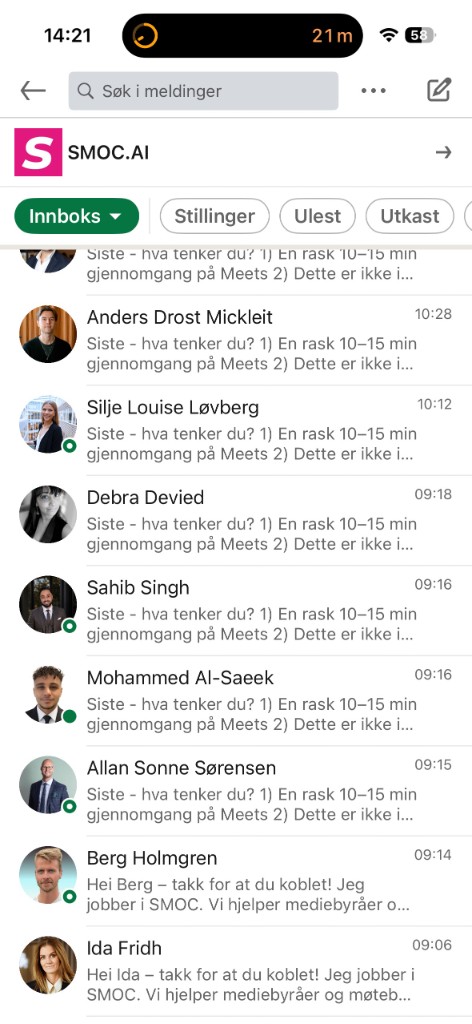
If a path uses Suggested Replies (sender), the agent waits for an operator. The composer explains that the flow is paused until you send a reply. Sending unblocks the run (operator_acted). Already-connected prospects can reach Inbox if the flow DMs them after Is connection Yes.
Suggestion chips follow the classified sentiment of the prospect's reply (the same Smart Lead / lead-outcome signal): positive (or not yet classified) shows the positive list; negative shows the negative list. If a negative reply has no negative chips, type a reply from scratch — the flow still waits until you send.
After your company has sent five replies from Inbox, a learned draft can replace those chips. It is written from the replies your team has sent, weighted toward the ones that moved the conversation forward, and fitted to this thread.
The draft is prepared when the prospect's message arrives, including a message the nightly sync finds later. Open the thread and it is already there. Click it to place the text in the composer. The prospect's name and your name are filled in before anything reaches LinkedIn. Edit the text if you want, then send. An edit becomes part of what the next similar draft learns.
The same card appears for:
Until those five sends exist, the sentiment chips stay. Once a learned draft is stored for the step, the chips are hidden.
When the prospect has closed the exchange — they agreed, declined, said thanks, or said they will come back, and nothing is left to arrange — the card says No reply needed. Mark the thread done. A short ok still gets a draft when a time, a link, or a next step is open. Follow-ups and reminders always get a message.
The writing guidance for these steps is revised once a week from the replies that worked. You send every message.
When a prospect's first reply is classified as negative, Inbox shows negative suggestion chips (or a learned draft once your team has enough examples). Positive leads and Smart Lead behavior are unchanged.
In Settings → LinkedIn or Settings → Email and calendar, you can optionally turn on Auto-reply on negative leads for the company or for one sender. It stays off by default. When enabled, SMOC may send the learned inbox draft automatically only when:
Du kan lägga till upp till två kampanjlänkar (HTTPS), var och en med valfri text före webbadressen (till exempel vad länken handlar om). De läggs till genererade utkast för negativa leads — även utkast du granskar — inte till förslagschips. Länkar gäller även när autosändning är av.
By default, Inbox does not send a learned draft on its own. Optional negative-lead auto-reply only runs when you enable it in Settings. The draft and the chips help; you stay accountable for sender reputation and tone.
A write-enabled MCP or REST key can send a text-only reply with inbox_threads_send (threadId, body, idempotencyKey). It cannot attach files or start a LinkedIn outreach campaign. Setup: Connecting SMOC with MCP.
Var AI körs
Webbchatt, kortflöden, LinkedIn och mejl delar ett system. AI gör varje jobb nedan. Raden under titeln säger var jobbet körs.
Varje agent
AI går igenom webbplatsen och skriver erbjudandet, målgruppen, rösten och varumärket. Webbchatt, kortflöden, LinkedIn och mejl utgår från det.
Instrumentpanel · Leadstrategi
Sätt ditt leadmål. AI simulerar tusentals kanalmixer, rangordnar dem efter effektivitet och visar den mest kostnadseffektiva planen. Dina data och ramar styr beräkningen.
Varje agent · tema på webben · listor på LinkedIn och mejl
AI skriver flödet. Temat körs på webbchatt och kort. Översättning körs på varje agent. AI hittar prospektlistan på LinkedIn. Mejl använder prospektlistorna du redan har.
Sökväg på varje flöde · webb, LinkedIn och mejl
Förstärkningsinlärning på flödets sökväg körs på varje agent. Rekommendationer körs på webben. Rätt tidpunkt och läsning av svar körs på LinkedIn och mejl.
Varje agent
AI föreslår en variant, använder din bedömning i nästa utkast och utgår från ett exempel som redan fungerar. Du tar ändringen i bruk.
Fortsätt med de här relaterade guiderna
Få produktuppdateringar och perspektiv på proaktiva AI-agenter, flerkanalsorkestrering och konvertering — utan bruset.
 Veckosignal om proaktiv AI-försäljning
Enter your email below to get started with SMOC.AI