01
AI lukee yrityksen
Jokainen agentti
AI käy sivuston läpi ja kirjoittaa tarjouksen, yleisön, äänen ja brändin. Verkkosivuchat, korttivirrat, LinkedIn ja sähköposti lähtevät siitä.
Avaa Inbox.
LinkedIn-vastaukset tulevat tänne. Flow odottaa, kunnes ihminen lähettää vastauksen.
Napsauta luonnosta, niin teksti tulee kirjoituskenttään nimet täytettyinä. Ehdotussirut pysyvät, kunnes opittu luonnos on olemassa.
Sinä lähetät jokaisen vastauksen. Muokkaus opettaa seuraavan samanlaisen luonnoksen. Jos kortti sanoo, ettei vastausta tarvita, merkitse säie valmiiksi.
Console Inbox is the human-in-the-loop surface for LinkedIn message flows. Prospects reply in LinkedIn; you answer here.
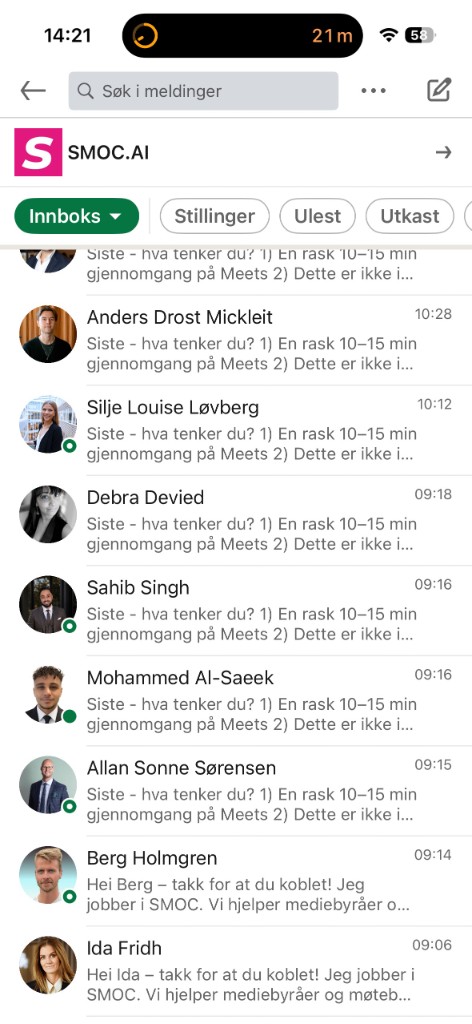
If a path uses Suggested Replies (sender), the agent waits for an operator. The composer explains that the flow is paused until you send a reply. Sending unblocks the run (operator_acted). Already-connected prospects can reach Inbox if the flow DMs them after Is connection Yes.
Suggestion chips follow the classified sentiment of the prospect's reply (the same Smart Lead / lead-outcome signal): positive (or not yet classified) shows the positive list; negative shows the negative list. If a negative reply has no negative chips, type a reply from scratch — the flow still waits until you send.
After your company has sent five replies from Inbox, a learned draft can replace those chips. It is written from the replies your team has sent, weighted toward the ones that moved the conversation forward, and fitted to this thread.
The draft is prepared when the prospect's message arrives, including a message the nightly sync finds later. Open the thread and it is already there. Click it to place the text in the composer. The prospect's name and your name are filled in before anything reaches LinkedIn. Edit the text if you want, then send. An edit becomes part of what the next similar draft learns.
The same card appears for:
Until those five sends exist, the sentiment chips stay. Once a learned draft is stored for the step, the chips are hidden.
When the prospect has closed the exchange — they agreed, declined, said thanks, or said they will come back, and nothing is left to arrange — the card says No reply needed. Mark the thread done. A short ok still gets a draft when a time, a link, or a next step is open. Follow-ups and reminders always get a message.
The writing guidance for these steps is revised once a week from the replies that worked. You send every message.
When a prospect's first reply is classified as negative, Inbox shows negative suggestion chips (or a learned draft once your team has enough examples). Positive leads and Smart Lead behavior are unchanged.
In Settings → LinkedIn or Settings → Email and calendar, you can optionally turn on Auto-reply on negative leads for the company or for one sender. It stays off by default. When enabled, SMOC may send the learned inbox draft automatically only when:
Voit lisätä enintään kaksi kampanjalinkkiä (HTTPS), kumpikin valinnaisella tekstillä ennen URL-osoitetta (esimerkiksi mitä linkki koskee). Ne liitetään luotuihin negatiivisen liidin luonnoksiin — myös luonnoksiin, joita käyt läpi — ei ehdotuschippeihin. Linkit koskevat myös silloin, kun automaattilähetys on pois päältä.
By default, Inbox does not send a learned draft on its own. Optional negative-lead auto-reply only runs when you enable it in Settings. The draft and the chips help; you stay accountable for sender reputation and tone.
A write-enabled MCP or REST key can send a text-only reply with inbox_threads_send (threadId, body, idempotencyKey). It cannot attach files or start a LinkedIn outreach campaign. Setup: Connecting SMOC with MCP.
Missä tekoäly pyörii
Verkkosivun chat, korttiflow’t, LinkedIn ja sähköposti jakavat yhden järjestelmän. Tekoäly tekee jokaisen työn alla. Otsikon alla oleva rivi kertoo, missä työ pyörii.
Jokainen agentti
AI käy sivuston läpi ja kirjoittaa tarjouksen, yleisön, äänen ja brändin. Verkkosivuchat, korttivirrat, LinkedIn ja sähköposti lähtevät siitä.
Hallintapaneeli · Liidistrategia
Aseta liiditavoitteesi. AI simuloi tuhansia kanavayhdistelmiä, järjestää ne tehokkuuden mukaan ja näyttää kustannustehokkaimman suunnitelman. Omat tietosi ja rajasi ohjaavat laskelmaa.
Jokainen agentti · teema verkossa · listat LinkedInissä ja sähköpostissa
AI kirjoittaa kulun. Teema toimii verkkosivuchatissa ja korteissa. Käännös toimii jokaisessa agentissa. AI löytää prospektilistan LinkedInistä. Sähköposti käyttää prospektilistat, jotka sinulla jo on.
Polku jokaisessa kulussa · verkko, LinkedIn ja sähköposti
Vahvistusoppiminen kulun polulla toimii jokaisessa agentissa. Suositukset toimivat verkossa. Oikea ajoitus ja vastausten lukeminen toimivat LinkedInissä ja sähköpostissa.
Jokainen agentti
AI ehdottaa varianttia, käyttää arviotasi seuraavassa luonnoksessa ja aloittaa esimerkistä, joka jo toimii. Sinä otat muutoksen käyttöön.
Jatka näiden aiheeseen liittyvien oppaiden parissa
Saa tuotepäivityksiä ja näkökulmaa proaktiivisiin tekoälyagentteihin, monikanavaiseen orkestrointiin ja konversioon — ilman hälyä.
 Viikoittainen signaali aiheesta proaktiivinen tekoälymyynti
Enter your email below to get started with SMOC.AI