01
IA lee la empresa
Cada agente
IA recorre el sitio y escribe la oferta, la audiencia, la voz y la marca. El chat del sitio, los flujos de tarjetas, LinkedIn y el correo parten de ahí.
Abre Inbox.
Las respuestas de LinkedIn llegan aquí. El flujo espera hasta que una persona envía la respuesta.
Haz clic en el borrador y el texto llega al campo, con los nombres rellenos. Las fichas de sugerencia siguen hasta que exista un borrador aprendido.
Tú envías cada respuesta. Una edición enseña al siguiente borrador parecido. Si la tarjeta dice que no hace falta respuesta, marca el hilo como hecho.
Console Inbox is the human-in-the-loop surface for LinkedIn message flows. Prospects reply in LinkedIn; you answer here.
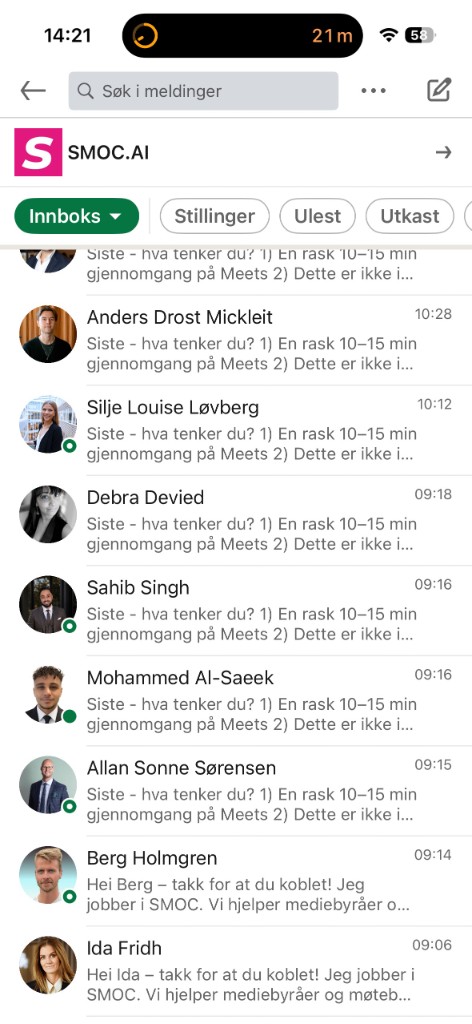
If a path uses Suggested Replies (sender), the agent waits for an operator. The composer explains that the flow is paused until you send a reply. Sending unblocks the run (operator_acted). Already-connected prospects can reach Inbox if the flow DMs them after Is connection Yes.
Suggestion chips follow the classified sentiment of the prospect's reply (the same Smart Lead / lead-outcome signal): positive (or not yet classified) shows the positive list; negative shows the negative list. If a negative reply has no negative chips, type a reply from scratch — the flow still waits until you send.
After your company has sent five replies from Inbox, a learned draft can replace those chips. It is written from the replies your team has sent, weighted toward the ones that moved the conversation forward, and fitted to this thread.
The draft is prepared when the prospect's message arrives, including a message the nightly sync finds later. Open the thread and it is already there. Click it to place the text in the composer. The prospect's name and your name are filled in before anything reaches LinkedIn. Edit the text if you want, then send. An edit becomes part of what the next similar draft learns.
The same card appears for:
Until those five sends exist, the sentiment chips stay. Once a learned draft is stored for the step, the chips are hidden.
When the prospect has closed the exchange — they agreed, declined, said thanks, or said they will come back, and nothing is left to arrange — the card says No reply needed. Mark the thread done. A short ok still gets a draft when a time, a link, or a next step is open. Follow-ups and reminders always get a message.
The writing guidance for these steps is revised once a week from the replies that worked. You send every message.
When a prospect's first reply is classified as negative, Inbox shows negative suggestion chips (or a learned draft once your team has enough examples). Positive leads and Smart Lead behavior are unchanged.
In Settings → LinkedIn or Settings → Email and calendar, you can optionally turn on Auto-reply on negative leads for the company or for one sender. It stays off by default. When enabled, SMOC may send the learned inbox draft automatically only when:
Puede añadir hasta dos enlaces promocionales (HTTPS), cada uno con texto opcional antes de la URL (por ejemplo de qué trata el enlace). Se añaden a los borradores generados para leads negativos — incluso los que revisa — no a los chips de sugerencias. Los enlaces aplican aunque el envío automático siga desactivado.
By default, Inbox does not send a learned draft on its own. Optional negative-lead auto-reply only runs when you enable it in Settings. The draft and the chips help; you stay accountable for sender reputation and tone.
A write-enabled MCP or REST key can send a text-only reply with inbox_threads_send (threadId, body, idempotencyKey). It cannot attach files or start a LinkedIn outreach campaign. Setup: Connecting SMOC with MCP.
Dónde corre la IA
El chat del sitio, los flujos de tarjetas, LinkedIn y el correo comparten un sistema. La IA hace cada trabajo de abajo. La línea bajo el título dice dónde corre ese trabajo.
Cada agente
IA recorre el sitio y escribe la oferta, la audiencia, la voz y la marca. El chat del sitio, los flujos de tarjetas, LinkedIn y el correo parten de ahí.
Panel · Estrategia de leads
Fija tu objetivo de leads. IA simula miles de mezclas de canales, las ordena por eficiencia y muestra el plan más rentable. Tus datos y tus límites guían el cálculo.
Cada agente · tema en la web · listas en LinkedIn y el correo
IA escribe el flujo. El tema se ejecuta en el chat del sitio y en las tarjetas. La traducción se ejecuta en cada agente. IA encuentra la lista de prospectos en LinkedIn. El correo usa las listas de prospectos que ya tienes.
Ruta en cada flujo · web, LinkedIn y correo
El aprendizaje por refuerzo en la ruta del flujo se ejecuta en cada agente. Las recomendaciones se ejecutan en la web. El momento adecuado y la lectura de respuestas se ejecutan en LinkedIn y en el correo.
Cada agente
IA propone una variante, usa tu revisión en el siguiente borrador y parte de un ejemplo que ya funciona. Tú aplicas el cambio.
Sigue con estas guías relacionadas
Recibe novedades del producto y una mirada sobre agentes de IA proactivos, orquestación multicanal y conversión, sin ruido.
 Señal semanal sobre ventas con IA proactiva
Ingresa tu correo electrónico a continuación para comenzar con SMOC.AI