01
AI læser virksomheden
Hver agent
AI gennemgår websitet og skriver tilbuddet, målgruppen, stemmen og brandet. Webchat, kortflows, LinkedIn og mail starter derfra.
Åbn Inbox.
Svar fra LinkedIn lander her. Flowet venter, indtil en person sender svaret.
Klik på udkastet, så lander teksten i skrivefeltet med navne udfyldt. Forslagsbrikker bliver, indtil et lært udkast findes.
Du sender hvert svar. En redigering lærer det næste lignende udkast. Hvis kortet siger, at intet svar behøves, markerer du tråden som færdig.
Console Inbox is the human-in-the-loop surface for LinkedIn message flows. Prospects reply in LinkedIn; you answer here.
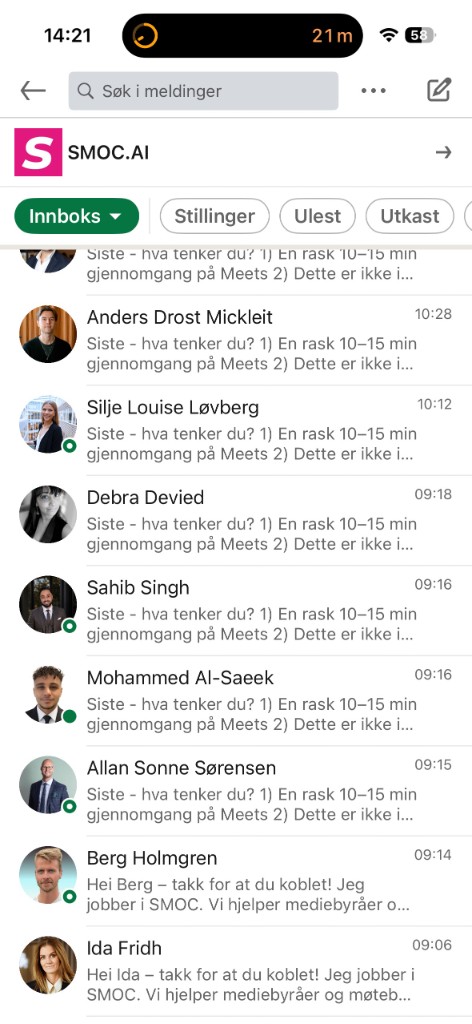
If a path uses Suggested Replies (sender), the agent waits for an operator. The composer explains that the flow is paused until you send a reply. Sending unblocks the run (operator_acted). Already-connected prospects can reach Inbox if the flow DMs them after Is connection Yes.
Suggestion chips follow the classified sentiment of the prospect's reply (the same Smart Lead / lead-outcome signal): positive (or not yet classified) shows the positive list; negative shows the negative list. If a negative reply has no negative chips, type a reply from scratch — the flow still waits until you send.
After your company has sent five replies from Inbox, a learned draft can replace those chips. It is written from the replies your team has sent, weighted toward the ones that moved the conversation forward, and fitted to this thread.
The draft is prepared when the prospect's message arrives, including a message the nightly sync finds later. Open the thread and it is already there. Click it to place the text in the composer. The prospect's name and your name are filled in before anything reaches LinkedIn. Edit the text if you want, then send. An edit becomes part of what the next similar draft learns.
The same card appears for:
Until those five sends exist, the sentiment chips stay. Once a learned draft is stored for the step, the chips are hidden.
When the prospect has closed the exchange — they agreed, declined, said thanks, or said they will come back, and nothing is left to arrange — the card says No reply needed. Mark the thread done. A short ok still gets a draft when a time, a link, or a next step is open. Follow-ups and reminders always get a message.
The writing guidance for these steps is revised once a week from the replies that worked. You send every message.
When a prospect's first reply is classified as negative, Inbox shows negative suggestion chips (or a learned draft once your team has enough examples). Positive leads and Smart Lead behavior are unchanged.
In Settings → LinkedIn or Settings → Email and calendar, you can optionally turn on Auto-reply on negative leads for the company or for one sender. It stays off by default. When enabled, SMOC may send the learned inbox draft automatically only when:
Du kan tilføje op til to kampagnelinks (HTTPS), hver med valgfri tekst før URL'en (for eksempel hvad linket handler om). De tilføjes genererede kladder til negative leads — også kladder du gennemgår — ikke til forslagschips. Links gælder selv når autosend er fra.
By default, Inbox does not send a learned draft on its own. Optional negative-lead auto-reply only runs when you enable it in Settings. The draft and the chips help; you stay accountable for sender reputation and tone.
A write-enabled MCP or REST key can send a text-only reply with inbox_threads_send (threadId, body, idempotencyKey). It cannot attach files or start a LinkedIn outreach campaign. Setup: Connecting SMOC with MCP.
Hvor AI kører
Websitechat, kortflows, LinkedIn og mail deler ét system. AI gør hvert job nedenfor. Linjen under titlen siger, hvor det job kører.
Hver agent
AI gennemgår websitet og skriver tilbuddet, målgruppen, stemmen og brandet. Webchat, kortflows, LinkedIn og mail starter derfra.
Dashboard · Leadstrategi
Sæt dit leadmål. AI simulerer tusindvis af kanalmixer, rangerer dem efter effektivitet og viser den mest omkostningseffektive plan. Dine data og rammer styrer regnestykket.
Hver agent · tema på web · lister på LinkedIn og mail
AI skriver flowet. Temaet kører på webchat og kort. Oversættelse kører på hver agent. AI finder prospektlisten på LinkedIn. Mail bruger de prospektlister, du allerede har.
Sti på hvert flow · web, LinkedIn og mail
Forstærkningslæring på flowstien kører på hver agent. Anbefalinger kører på web. Rigtigt tidspunkt og læsning af svar kører på LinkedIn og mail.
Hver agent
AI foreslår en variant, bruger din vurdering i næste udkast og starter fra et eksempel, der allerede virker. Du tager ændringen i brug.
Få produktopdateringer og perspektiv på proaktive AI-agenter, flerkanalsorkestrering og konvertering — uden støjen.
 Ugentligt signal på proaktivt AI-salg
Enter your email below to get started with SMOC.AI